
A few weeks ago I gave a talk at WordCamp US about account hijacking. I told the audience that I might sound apocalyptic, but I was not. This is the reality of working online nowadays – we are bombarded with realistic phishing and scam attacks. A few days ago, I proved my point with one of the many emails and invitations I have been getting in my inbox and on my Google Calendar. Here are all the details;
What I talked about at WordCamp US
My WordCamp US talk was about how attackers hijack WordPress user accounts and sessions, what the risks are, and what types of attacks are out there. In the presentation I’ve focused a lot on training as part of the solution, because your employees / team / website users need to know which attacks exist and what the dangers of working online are. I went through a number of things you can do about it. You can watch the full presentation here: Session Hijacking, Stolen Cookies, and the Blind Spot in WordPress Security
Session hijacking is not a theoretical problem. In the June 2026 Fraud and Scams Advisory, Google describes attackers mirroring legitimate login flows to capture both the password and the session cookie, which gets them past multi-factor authentication (MFA). The same advisory names another tactic, calendar phishing, which is the one that I am writing about, and ended up in my inbox and calendar.
It happens to all of us
This is not the first time I have received one of these. Before, I ignored them. But they are becoming more frequent, and more realistic so I researched this a bit. It happens to all of us, and it can happen to anyone. And everyone can have a bad day, be tired, and make a bad decision – as a result, fall victim to these type of attacks.
The attack: an overdue invoice sent for collection
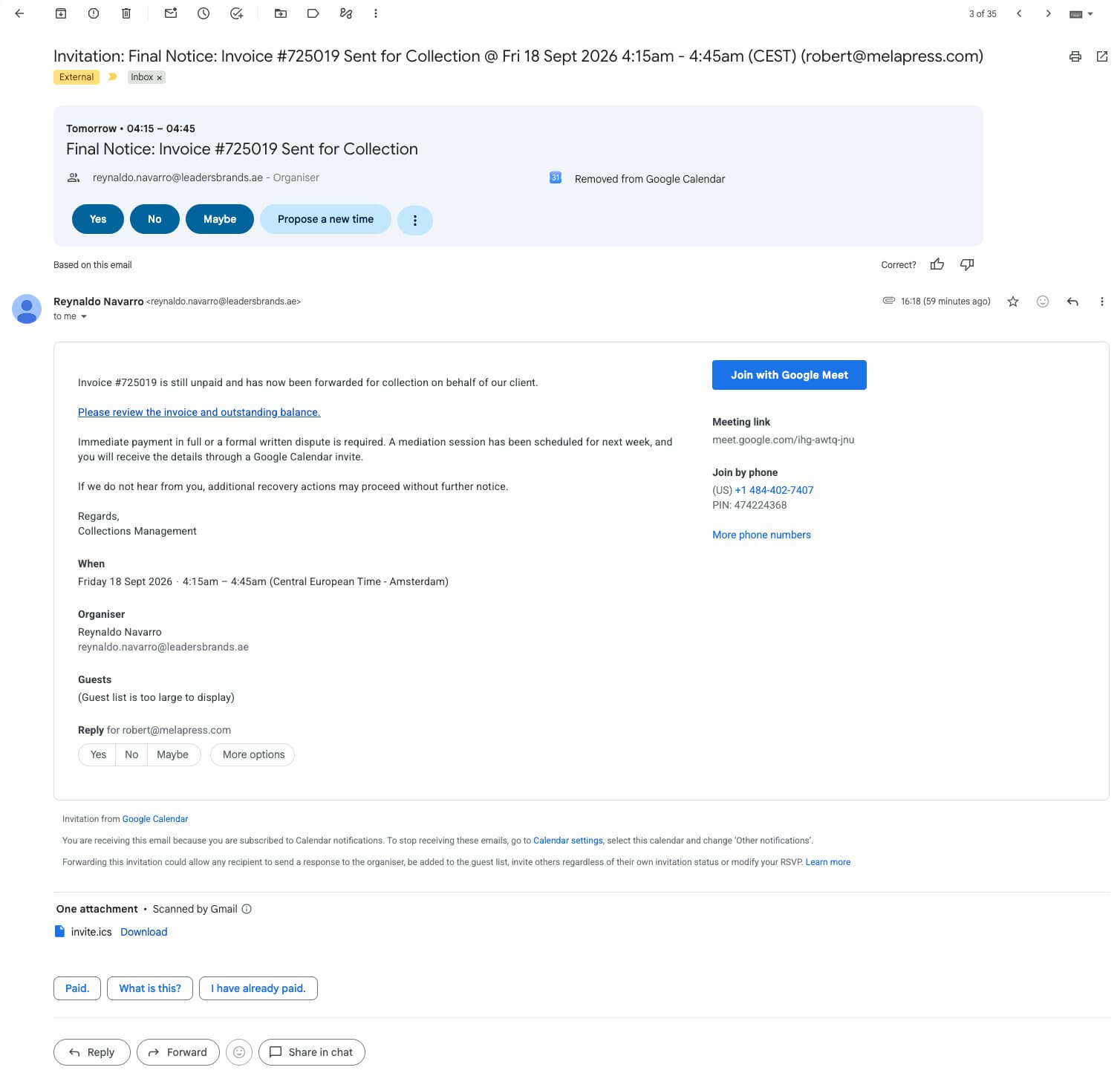
I received a Google Calendar invite from Reynaldo Navarro, reynaldo.navarro@leadersbrands.ae. The invite was titled “Final Notice: Invoice #725019 Sent for Collection” and scheduled for the next day.
The invite said the invoice was still unpaid and had been forwarded for collection on behalf of their client. It asked for immediate payment in full or a formal written dispute, and said a mediation session had been scheduled for the following week. If they did not hear from me, further recovery actions could follow without notice. In other words, we supposedly owed some money.
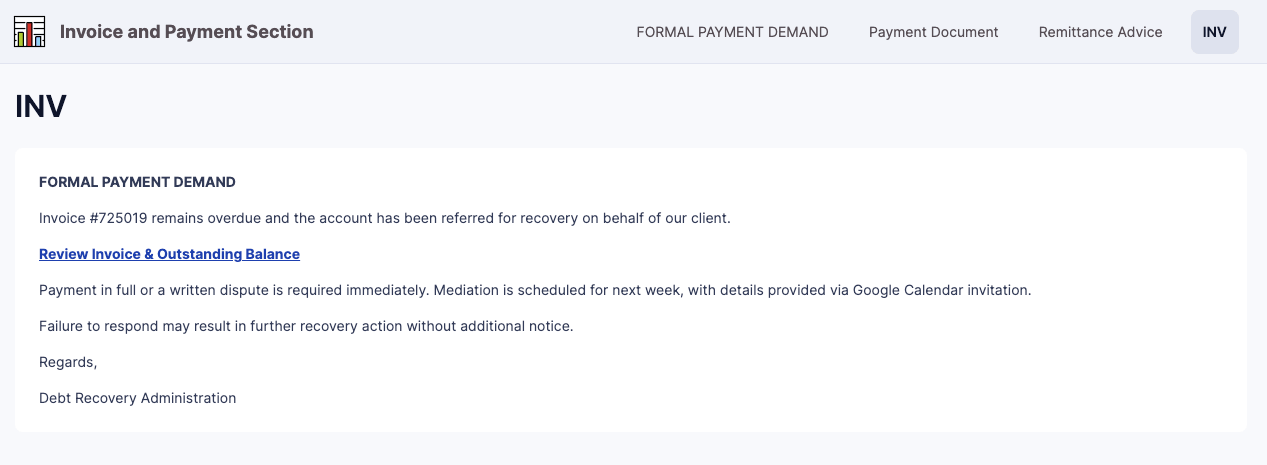
The invite linked to a page where I could “review the invoice and outstanding balance.” That page was hosted on Knack, a legitimate no-code app platform, and it repeated the same message under the heading “Formal Payment Demand.” From there, another link led to the actual phishing website.
Why it is so credible
The email address is real, and Leaders Brands is, as far as I can tell, a real business in the UAE. Most probably, someone hijacked that person’s Google Workspace account and used it to send the invite. So the invite genuinely comes from Google’s servers, the sender has a good reputation, and it sails past spam filters.
On top of that, Google Calendar adds events automatically by default. The event lands on your calendar whether you accept it or not.
The Knack page is the credibility layer. Because Knack is legitimate, its URLs pass reputation filters and domain blocklists. The attacker just rebuilt the email inside a Knack app. A legitimate email account, a legitimate app, and a legitimate Google invite. Only the link that led out of Knack was not legit. To Google, everything about this looks legitimate unless someone reports it.
In fact, at first I started questioning it myself, and I like to think I know a thing or two about security. So before clicking anything, I checked our accounts to make sure we did not have any pending payments, any invoice with that number, or any contacts with that email address. We did not. Then I started digging a bit deeper and looked at where the links actually led.
The red flags that gave it away
Once you look closely, there are several things that do not add up:
- The guest list is “too large to display.” This was a bulk spray, not an attack targeted at Melapress or me. Other people, possibly at the same domain, most likely received it too.
- The meeting was at 04:15 CEST. Nobody schedules a mediation session at 4 in the morning. That is what you get from automated sending in another timezone.
- The sender is a real business account. reynaldo.navarro@leadersbrands.ae is almost certainly a compromised Google Workspace account, which is how the attacker gets a genuine, Google-signed invite.
- The page sits on a legitimate platform. The Knack page exists to borrow Knack’s reputation, so the link does not get blocked.
- The final link goes to devco.top with a unique token. The domain is a .top domain, and the link ends with a string of characters (?88b5cc81) that is unique to each recipient. That is a tracking ID. Clicking it confirms your mailbox is live and tells the attacker who took the bait. Treat the link as burned, even if you do not fill anything in on the page.
- There is no amount, no client name, no letterhead, and no jurisdiction. Real collection agencies are legally obliged to identify the creditor.
What to do if you get one of these
If a calendar invite like this ends up in your calendar:
- Do not click Yes, No, or Maybe. Any RSVP confirms your address is active.
- Open the event, click the three-dot menu, and select Report as spam, then delete it. Deleting it alone does not help Google’s detection.
- If you want to know what is behind the link, check it with an online service such as urlscan.io rather than opening it yourself.
- In Google Calendar settings, set “Add invitations to my calendar” to “Only if the sender is known.” This is a per-user setting, so tell your team about it rather than assuming someone can switch it on centrally.
- If you manage a Google Workspace, block the sending domain and the phishing domain, and check the logs to see who else received the invite and whether anyone clicked through.
If someone did click and was asked to install something, especially a remote access tool, treat it as a security incident, not as spam. Some of these campaigns install legitimate remote monitoring tools such as LogMeIn Resolve instead of showing a login form.
Lesson one: user visibility is a must
There is a lot to learn from this type of attack, and the first lesson is the importance of user visibility.
You need to keep track of your users. Your website users, your network users, anyone within your business who has access to emails, and anyone in your team. Most probably, Reynaldo Navarro’s account has been hacked and no one in his team knows yet. Until someone reports it, they have no way of finding out. Meanwhile, that account is sending phishing invites to a guest list too large to display.
The same applies to WordPress. If one of your users’ accounts or sessions is hijacked, you want to know who logged in, from where, and what they did, before a third party tells you. On WordPress, that is what an activity log such as WP Activity Log is for.
Lesson two: the attacks are sophisticated, so train your users
I nearly questioned whether we actually owed this business money, and after that I spend days thinking about user security. Now imagine someone in accounts receiving that invite on a busy Friday afternoon, with an invoice number, a deadline, and a threat of further action.
This is why I talked about training at WordCamp US. Your users need to know that attacks like this exist, that a legitimate sender does not mean a legitimate message, and that the right first step is to check independently, like looking up the invoice in your own systems, before clicking anything. Yes, training takes time, and people will still get it wrong sometimes. But a user who knows what calendar phishing looks like is far more likely to stop and report it.
Harden, monitor, and educate
AI and all this technology are allowing everyone to create more sophisticated attacks, and that includes attackers. The good news is that we have the technology to defend ourselves too.
So harden your systems, your website, and your email. Use user visibility tools. Educate your users, train them, and help them keep their accounts secure, for example with multi-factor / two-factor authentication and implement strong login security policies. As you can see, everyone can come across this type of attack. Even when everything about it looks legitimate.