
When people talk about WordPress security, most of the focus is on the server and website side; what administrators can configure, install, or harden. You will find a lot of information about:
- Firewalls
- Vulnerability scanners
- Malware scanners
- WordPress hardening guides
- Server configurations
All of these are important. However, we are often missing one very common cause of breaches from the conversation: user security — the security of the accounts used by the people who actually log into WordPress and operate the site.
Compromised user accounts are one of the top two reasons WordPress websites get hacked. The other one is outdated software. Yet user security is rarely covered properly. Because of this lack of awareness, it is often treated as a “nice to have”, or worse, something left entirely to user behaviour.
In this article I explain why this is a problem, and suggest practical best practices, policies to implement, and plugins you can use to improve WordPress user security. You do not need expensive software or complex technical setups. You can achieve a high level of user security using free WordPress plugins and some common sense.
Video: I covered this topic in my talk at WordCamp Gdynia 2025. The article expands on the ideas from that session. The video is below.
The numbers show us the problem
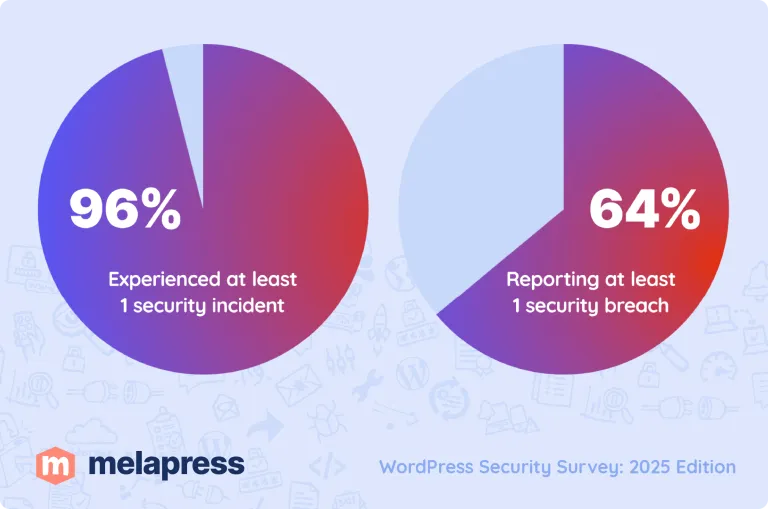
Every year at Melapress, we run a WordPress security survey. If you look at the numbers, you quickly understand why user security is such a big issue. From the Melapress WordPress Security Survey 2025:
- 96% of respondents experienced at least one security incident
- 64% reported at least one security breach
- Only 26% train their team or have been trained (there is a clear correlation: websites with untrained users get breached more often)
For more details and the full results, refer to the WordPress Security Survey.
Most WordPress breaches are user failures, not technical ones
When a WordPress site is hacked, the assumption is often that something “broke through” the technical defences.
In practice, many incidents start much earlier and much simpler. User accounts get compromised because of:
- Weak or reused passwords
- Shared credentials
- No login policies or enforcement
- No authentication hardening (still relying only on username and password)
- Phishing and social engineering
- Users logging in from insecure devices or networks
Once an attacker gains access to a legitimate user account, the firewall and other protective measures become mostly irrelevant. The attacker does not need to exploit anything, they are already logged in to the website.
Some argue that if the compromised account is not an administrator account, the damage is limited. That is not entirely true. It might make things more difficult, but it is far from harmless. A non-admin account can still be used for reconnaissance, social engineering, or to identify misconfigurations that allow privilege escalation.
That is why focusing exclusively on server-side security creates a false sense of safety.
Do not build WordPress security that depends on user discipline
We need to lower our expectations. Many WordPress security setups quietly assume that users will behave responsibly and use a VPN, choose strong passwords, avoid public Wi-Fi, and recognise phishing attempts.
They won’t. Not because they do not care, but because security is not their job. Expecting your team to remember rules, spot every phishing email, or always use the correct device is unrealistic. The responsibility for security sits with the site owner and administrators. Not with editors, marketers, or clients.
The goal is not to make users “better at security”. The goal is to remove the need for them to constantly make security decisions in the first place.
Automate security wherever possible
Passwords are the easiest example. Users will use weak passwords, and keep reusing the same weak passwords wherever they can They will store them in a clear text file and write them down on sticky notes.
No amount of training fixes that. Automation does. Enforce strong password policies with the WordPress plugin Melapress Login Security and combine this with password managers that automatically generate and store secure passwords. This removes guesswork completely.
Users do not need to understand what “strong” means. They do not need to invent new passwords every 30 days. The system handles that.
Use Passkeys
A more secure alternative to traditional passwords are Passkeys. They cannot be phished and remove password reuse entirely. Adoption is still growing, but they are worth looking into. We covered this in detail in our Melapress podcast episode about Passkeys.
You can easily try Passkeys on your website with the free plugin WP 2FA.
2FA / MFA is no longer optional
Relying on passwords only does not cut it anymore. Credentials get leaked all the time through phishing attacks, malware, reused passwords from other services, and simple human error.
2FA changes that equation completely. Even if the password is compromised, the account is not. That is why 2FA should be mandatory for any user who can:
- Change the site configuration
- Access sensitive data
- Access payment or customer information
- Affect other users
You can easily implement and require 2FA with WP 2FA
Yes, it introduces an extra step during login. But the trade-off is simple: a slightly slower login versus a full site takeover. Most pushback around 2FA is not about security. Almost everyone uses 2FA already for Google, Facebook, or online banking. The issue is usually poor communication and bad rollout.
Explain what you are changing and why. Give your users a grace period to set up 2FA, which allows them to learn more about the process and change. You should also provide backup options and make make yourself or the tech team available to offer support, especially in the early days.
Roll it out properly and resistance drops significantly.
User roles matter more than most people think
Authentication is only part of the equation. What happens after a user logs in to the website is just as important. Here is an exclusive: Not every user needs administrator access.
Most users should not have admin access. Using proper user roles allows you to define:
- What information users can see
- Which sections of the site they can access
- What changes they can make
- What processes they can trigger
Follow the principle of least privilege and give users exactly what they need to do their job and nothing more. If you are looking for an easy to use plugin to create custom WordPress user roles and assign multiple roles to a user, use our plugin Melapress Role Editor.
Security rules must be documented and enforced
Security rules that are not written down do not survive. If users do not know what is allowed, they will guess. If enforcement is manual, it will eventually be forgotten. Hence why you two solid and well-documented processes:
- User onboarding
- User offboarding
Onboarding is important and custom roles / the correct privileges should be enforced right away. If you leave it for “another day” it will be too late.
Offboarding is particularly important. When someone leaves, disable or delete the account. Revoke access properly. Old and inactive user accounts on WordPress websites are a very big problem, and a common point of entry for many attackers.
The core idea
Most WordPress sites do not get hacked because attackers are brilliant. They get hacked because the basics are ignored.
Weak passwords.
No 2FA.
Too much access.
Old accounts left behind.
Users who were never told what to watch out for.
None of this is complicated. And none of it requires expensive tools. Good user security is about designing systems that assume users are human, not perfect. Systems that reduce risk quietly and consistently, without relying on constant vigilance.
It is not flashy security, but it is the kind that actually works.
Learn more about WordPress user security
If you want a more detailed walkthrough, including more examples and implementation options, watch the full WordCamp Gdynia talk below. During the talk, I expand on these ideas and shows how to apply them in real WordPress setups.